Base Network P2P Crypto Payment Module: Complete User & Integration Guide
Welcome to the documentation for the P2P Crypto Payment Module, a self-hosted, zero-middleman gateway designed specifically for e-commerce platform. This module enables online stores to accept decentralized payments directly into their wallets using the Base Network (for USDC and ETH) and the Bitcoin Lightning Network (for BTC), completely eliminating third-party processing fees.
Key Features & SEO Highlights
- True Peer-to-Peer (P2P) Gateway: Cryptographic payments go directly from the customer's wallet to the merchant's wallet.
- Hybrid Network Architecture: Built exclusively for the Layer-2 Base network (USDC/ETH) and Bitcoin Lightning Network (BTC), ensuring ultra-low transaction fees and near-instant settlement.
- Automated Blockchain Verification: The system securely verifies transaction status via Base Mainnet RPC nodes for Base assets and validates Bitcoin Lightning payments instantly via LNbits.
- Real-Time Price Formatting: Dynamically fetches current cryptocurrency rates using a cached CoinGecko API connection.
- Built-in Tax & Analytics Dashboard: Tracks income across separate assets (ETH, USDC, BTC) with one-click CSV exporting for financial reporting.
1. Merchant Setup & Configuration
To activate and manage your cryptocurrency payment gateway, navigate to Extensions > Payments > Crypto P2P within your administration panel.
Settings Configuration

- Set Active Wallets: Input your unique wallet destination addresses for USDC, Ethereum (ETH), and your Bitcoin (BTC) Lightning Address. Ensure all USDC and ETH addresses are strictly native to the Base Network.
- Order Status Rules: Define which order status should be automatically applied once a payment is successfully verified on the blockchain (e.g., Processed or Pending).
- Module Status: Toggle the global status to Enabled to make the option available at checkout.
Free Plan Account Limits: The trial version of this module allows up to 3 successful payments or a maximum volume of $300 USD. To process unlimited consumer volume, upgrade your license directly from the admin interface.
Sales Dashboard & Tax Exporting
The primary analytics tab offers a real-time summary of your store's crypto performance:
- Total Payments Volume: Consolidated view of all processed revenue converted to fiat.
- Asset Breakdown: Independent revenue metrics tracking total USDC, BTC, and ETH balances received.
- IRS-Ready Exporting: Click the Export CSV for IRS button to instantly download a structured spreadsheet containing Order IDs, asset methods, precise timestamps, transaction values, and historical USD exchange rates.

2. Customer Checkout Workflow
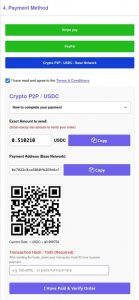

The module introduces a highly secure and intuitive workflow for online shoppers during checkout.
Step 1: Asset Selection
The buyer selects Crypto P2P as their payment method and chooses their asset (ETH, USDC, or BTC).
Step 2: Interactive Payment Portal
Upon confirming the order, the gateway presents an isolated, clean payment terminal containing:
- Exact Amount to Send: The module automatically converts the fiat cart total into the exact crypto fraction required. For Base network assets, it automatically appends a subtle micro-addition linked to the specific Order ID to prevent payment mixing. For Bitcoin Lightning, it rounds the amount strictly to Satoshis.
- Payment Address & QR Code: Displays the merchant's deposit address or a dynamic Lightning invoice alongside a clean, scannable QR code compatible with popular Web3 and Lightning wallets.
- 5-Minute Rate Lock: The current exchange rate is securely locked for 5 minutes to safeguard both the customer and merchant from crypto volatility.
Step 3: Transaction Proof & Verification
- For Base Network Assets (USDC/ETH): The customer sends the specified funds from their personal wallet via the Base Network. Once sent, the buyer copies their unique Transaction Hash / TxID and pastes it into the dedicated verification field.
- For Bitcoin Lightning (BTC): The system generates an immediate payment request, and verification happens automatically once the invoice is settled.
Clicking "I Have Paid & Verify Order" triggers the backend code check.
3. Transaction Verification & Security
To ensure security, the module implements a transaction hash check that can be viewed online:
- USDC and Ethereum: The administrator can view the transaction hash online via a blockchain explorer to verify payments.
- Bitcoin Lightning: Payment hash verification for Bitcoin transactions is handled automatically through lnbits.com.
